

Enterprise AI is moving from experiments to real business systems, helping companies automate tasks, support customers, and build new products.
The challenge starts when AI moves beyond one application. Each new use case introduces more data connections, model dependencies, permissions, integrations, infrastructure, and governance requirements. Without a shared architecture, that complexity compounds.
McKinsey’s research found that 88% of organizations use AI, yet only 7% have fully scaled it. This guide explores what it takes to build an enterprise AI platform that can scale.
Why Enterprise AI Needs a Platform, Not Just AI Tools
A single AI tool can solve a single problem. An enterprise platform needs to support many AI use cases across different teams and systems.
For example, a company may need AI for customer support, employee search, document analysis, sales, finance, and software development. Building each use case separately can lead to different models, data connections, security rules, and monitoring systems.
A shared platform gives these applications a common foundation.
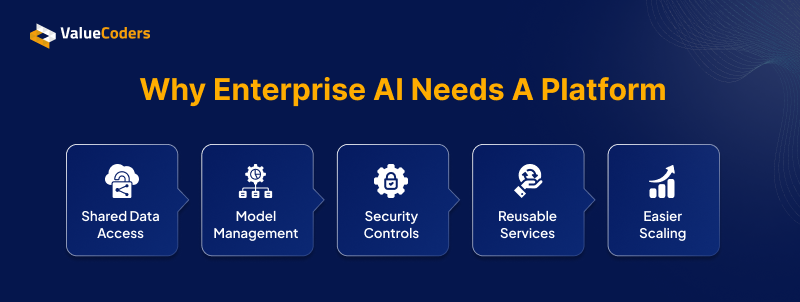
It can provide:
Shared Data Access
Avoid rebuilding data connections and permissions for every AI application.
Model Management
Use and manage multiple AI models through a common platform instead of creating separate setups for each use case.
Security Controls
Apply access rules, data protection, and model permissions consistently across AI applications.
Reusable Services
Reuse common capabilities like search, APIs, logging, and monitoring instead of building them from scratch each time.
Easier Scaling
Add new AI applications and use cases without rebuilding the underlying platform.
The goal is simple: make AI applications easier to build, manage, and scale across the enterprise.
We help you identify the architectural decisions that will shape your enterprise AI platform.
Also Read: AI Coding Is Faster. Is It Actually Cheaper?
The Core Architecture of an Enterprise AI Platform
A scalable enterprise AI platform structure brings these capabilities together to support AI applications across data, models, business systems, and infrastructure. Each layer addresses key engineering decisions that affect how AI platforms are built, secured, and scaled.
Data Layer
- Make the right business data accessible to AI.
- Keep data accurate, fresh, and searchable
- Enforce data permissions and traceability
AI and Model Layer
- Choose models based on use case, cost, and performance
- Route workloads to the right model when needed
- Keep model access controlled and replaceable
Application and Orchestration Layer
- Connect AI to existing business systems and workflows
- Define where agents, tools, and APIs are used
- Add human review for critical AI actions
Infrastructure Layer
- Scale compute and storage as AI workloads grow
- Design for availability, isolation, and failure recovery
- Keep deployment environments secure and manageable
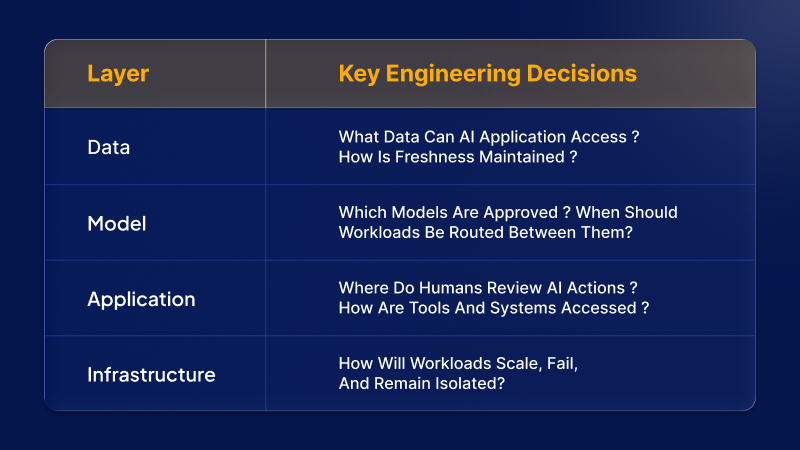
| Layer | Key engineering decisions |
| Data | What data can AI application access? How is freshness maintained? |
| Model | Which models are approved? When should workloads be routed between them? |
| Application | Where do humans review AI actions? How are tools and systems accessed? |
| Infrastructure | How will workloads scale, fail, and remain isolated? |
Together, these layers provide the foundation to build, deploy, and scale enterprise AI reliably.
Designing the Data Layer for Enterprise AI
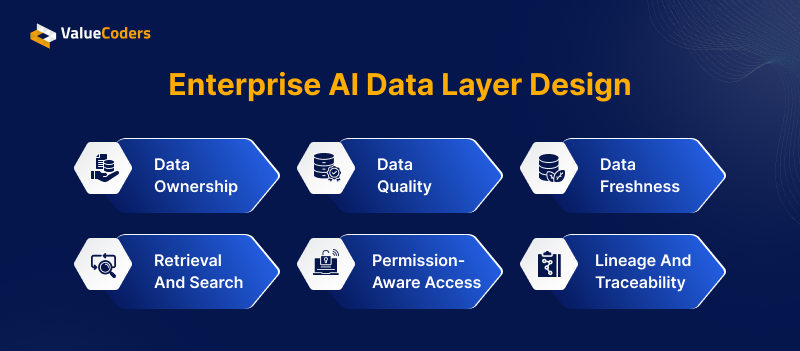
Enterprise data is spread across databases, documents, cloud storage, and business systems. To make it useful for AI, organizations need clear ownership, reliable data, fast retrieval, and controlled access.
1. Data Ownership
Define who owns each data source, who can manage it, and who is responsible for keepiEnterprise AI Data Layer Design ng it AI-ready.
2. Data Quality
Set checks to identify duplicate, outdated, or inaccurate data before it reaches AI applications.
3. Data Freshness
Keep data and indexes updated so AI applications work with current business information.
4. Retrieval and Search
Use metadata, indexing, embeddings, and vector search to help AI retrieve the right information quickly.
5. Permission-Aware Access
Make sure AI follows existing data permissions so users only access information they are authorized to see.
6. Lineage and Traceability
Track where data comes from, how it changes, and where it is used to support governance and troubleshooting.
The goal is to create a data layer that is trusted, accessible, and ready for enterprise AI.
Also Read: N8n vs Make vs Zapier vs Agentforce – Which AI Automation Platform Fits Your Business Best?
Building Security and Governance Into the Platform
Security and governance are cross-cutting platform capabilities. Leading AI consulting services providers suggest not to separate layers added after the platform is built.
The platform should control:
- Identity: Verify who is using the AI system.
- Access: Decide which data and tools each user can access.
- Data Protection: Encrypt sensitive information and protect it during transfer.
- Audit Logs: Record important AI and system activity.
- Model Controls: Track which models are approved and where they are used.
- Data Policies: Define how sensitive information can be stored, processed, and shared.
Governance should also cover how models are tested, approved, monitored, and changed.
NIST’s AI Risk Management Framework groups AI risk management into four areas: Govern, Map, Measure, and Manage. This supports a continuous approach to managing AI risks across the system lifecycle.
Build security, access, auditability, and governance into your AI platform.
What It Takes to Run AI Reliably in Production
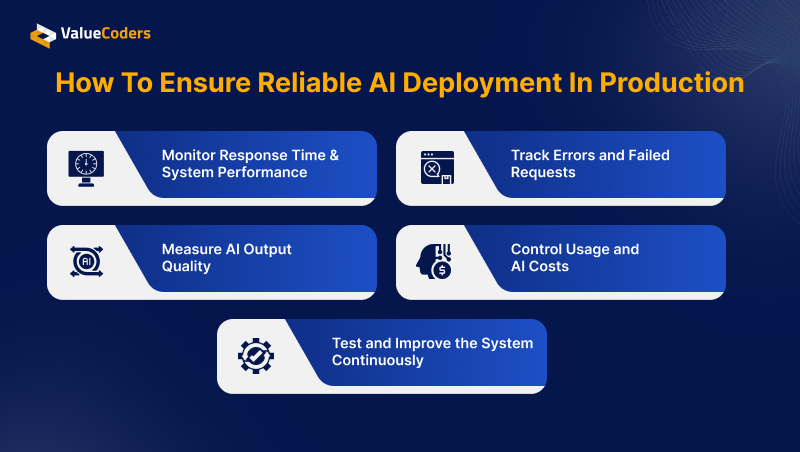
An AI application can perform well during testing but behave differently when hundreds or thousands of users start using it. Production systems face real traffic, changing data, model failures, higher costs, and unexpected user inputs.
That is why AI applications need ongoing monitoring and testing after deployment, supported by the enterprise AI platform.
1. Monitor Response Time and System Performance
Track how quickly the AI responds and whether the system can handle the number of requests it receives. Slow responses can affect user experience, while sudden performance drops may point to infrastructure or model problems.
2. Track Errors and Failed Requests
AI applications depend on many services, including models, APIs, databases, and retrieval systems. A failure in any one of them can affect the final response, so teams need logs and alerts to quickly find and fix failed requests.
3. Measure AI Output Quality
A response can be technically successful but still be wrong or unhelpful. Teams should evaluate answers for accuracy, relevance, hallucinations, and retrieval quality to make sure the AI is actually solving the intended task.
4. Control Usage and AI Costs
Every AI request can consume computing resources and model tokens. Tracking usage by application, team, or use case helps businesses understand where money is being spent and choose smaller or more efficient models when possible.
5. Test and Improve the System Continuously
Production AI needs regular testing as models, prompts, data, and applications change. Teams should test for issues such as incorrect answers, data leakage, unsafe outputs, prompt injection, and failed tool calls, then use the results to improve the system.
A practical production cycle is:
Build → Test → Evaluate → Deploy → Monitor → Improve
This makes AI operations a continuous process rather than something that ends when the application goes live.
How to Build an Enterprise AI Platform That Can Evolve
AI technology changes quickly. New models and tools can make today’s architecture look different within a short time.
The platform should therefore avoid depending too heavily on one model or provider.
A flexible enterprise AI platform architecture should:
- Use common interfaces between applications and models
- Keep data services separate from models
- Support multiple model providers
- Build reusable platform services
- Make it easy to add new data sources
- Allow new AI applications to use existing services
- Scale infrastructure as demand grows
For example, using a model gateway means an application does not need to know every detail about the model provider behind it.
The goal is not to predict which AI technology will win. It is to build a platform that can adapt when the technology changes.
Design an enterprise platform built around your data, models, systems, and infrastructure.
Also Read: AI Integration vs AI Development: Why Most Projects Fail at the Integration Layer
How ValueCoders Can Help Build Enterprise AI Platforms
Building enterprise AI is not just about choosing the right model. It is about creating the right foundation around your data, systems, workflows, and business goals.
ValueCoders brings data, cloud, integration, security, and DevOps expertise along with top AI engineers together to design platforms that work with your existing technology and evolve with your AI roadmap.
We engineer the platform and supporting capabilities that help AI applications connect to enterprise data, models, business systems, and infrastructure.
Building your enterprise AI roadmap? Talk to our AI experts.
FAQs
1: What does an enterprise AI platform need to support production AI applications?
Ans: It needs reliable data access, AI model management, secure integrations, scalable infrastructure, monitoring, and governance. It should also support testing, access controls, logging, and human review where needed.
2: How much does it cost to build an enterprise AI platform?
Ans: The cost depends on the number of AI use cases, data sources, integrations, models, security needs, and infrastructure. A focused platform for a few use cases will cost less than a large platform supporting multiple teams and systems.
3: How long does it take to build an enterprise AI platform?
Ans: A basic platform can take a few months, while a larger enterprise platform may take longer. The timeline depends on the architecture, integrations, data preparation, security requirements, and number of AI applications.
4: Can an enterprise AI platform integrate with our existing systems and data sources?
Ans: Yes, it can connect with databases, data warehouses, CRM and ERP systems, APIs, cloud storage, and internal applications. The integration approach should preserve existing data permissions and security controls.
5: How do we make an enterprise AI platform scalable as AI usage grows?
Ans: Use modular architecture, scalable cloud resources, containers, model routing, caching, and monitoring. The platform should allow compute, storage, and AI services to scale as users and workloads increase.
6: How should enterprises handle AI security, governance, and compliance?
Ans: Build security into every layer of the platform. Use identity and access controls, encryption, audit logs, data policies, model monitoring, and regular risk assessments to protect data and manage AI use.
7: Should we build an AI platform in-house or work with an AI development company?
Ans: It depends on your internal skills, timeline, budget, and platform complexity. In-house teams offer greater control, while an experienced AI development company can provide specialized skills and help reduce development time.
8: How can we modernize our existing infrastructure for enterprise AI?
Ans: Start by assessing your current applications, data, infrastructure, and integration points. Then modernize in stages by improving data pipelines, APIs, cloud infrastructure, security, and deployment processes instead of replacing everything at once.